In 2026, the question is no longer whether AI is accessible to businesses. It is. The real question is how to build an AI system that delivers measurable value without letting costs spiral as usage grows.
That matters because the economics of AI have changed. Model access is broader, smaller models are more capable, and companies now have more ways to optimize costs through architecture choices like model routing, caching, retrieval, and hybrid pipelines. At the same time, pricing has become more layered: beyond basic input and output tokens, teams now need to account for cached input, tool usage, search or grounding, OCR, orchestration, monitoring, and compliance overhead.
The model landscape has changed quickly as well. OpenAI’s current API docs point developers toward the GPT-5.4 family, Anthropic’s published lineup includes Claude Opus 4.6, Sonnet 4.6, and Haiku 4.5, Gemini’s current docs center Gemini 3.1, and DeepSeek’s API docs list DeepSeek-V3.2 behind deepseek-chat and deepseek-reasoner.
In this guide, we break down what “AI system cost” really means in 2026, what businesses should budget for different types of AI solutions, and which hidden cost drivers tend to appear only after a prototype starts seeing real usage.
Build Cost-Effective AI with Expert Full-Stack Talent
What Goes Into Building an AI System in 2026?
Before diving into numbers, it’s important to understand what actually makes up the cost of an AI system today — especially when you’re working with hosted LLMs rather than training a model from scratch.
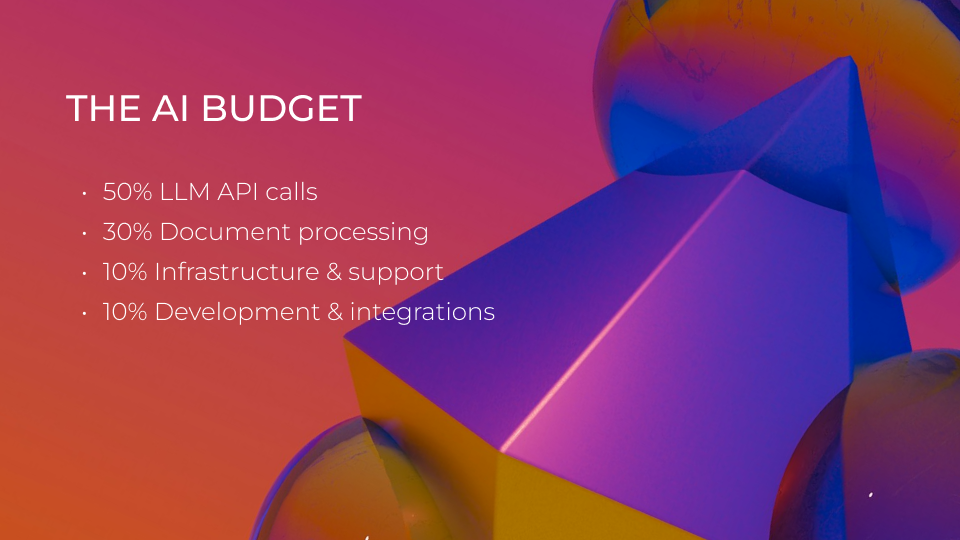
Here’s what typically contributes to the overall budget:
LLM API Usage
At the core of most AI systems today is an API call to a hosted LLM. Costs depend on:
- The provider (e.g. OpenAI, Anthropic, Google, DeepSeek)
- The model tier and performance level
- The number of requests and total token volume
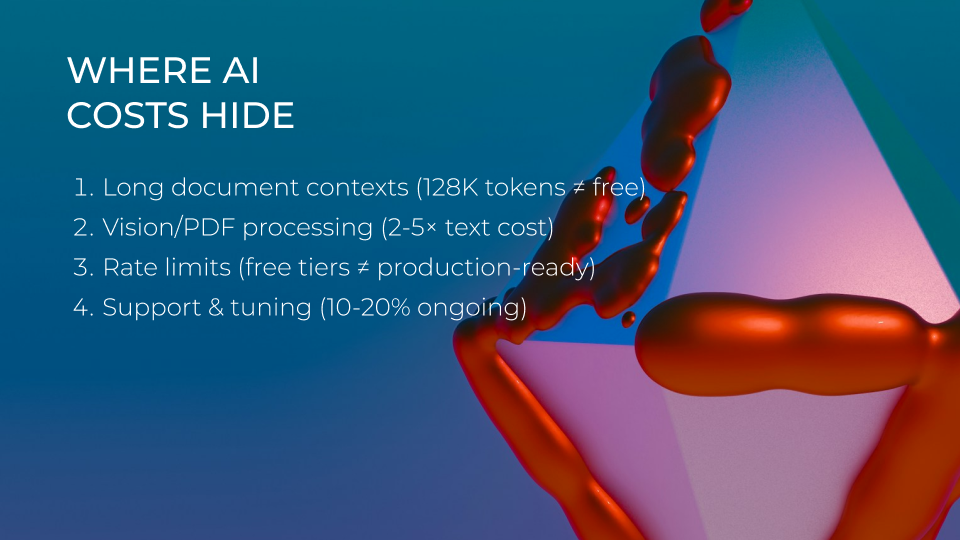
- Whether caching, tool usage, or long-context processing is involved
Token-based pricing is the standard, but in 2026 it’s more layered than it used to be. In addition to input and output tokens, some providers now price cached input, search grounding, or tool usage separately. These charges are often one of the biggest recurring costs in LLM-powered systems.
Document Parsing or Vision-Based AI
If your system processes invoices, forms, contracts, PDFs, receipts, or scanned documents, you’ll likely need more than an LLM alone. In many real-world workflows, companies combine OCR or document intelligence tools with an LLM for reasoning, classification, or summarization.
These services may charge per page, per document, or by processor type, depending on the provider. If your workflow includes large document volumes, this can quickly become a major part of the total cost.
Infrastructure & Integrations
Even when the models are hosted, you’ll still need cloud infrastructure and application logic to:- Orchestrate LLM calls
- Handle user input and output
- Store or retrieve documents and data
- Power search or retrieval workflows
- Log and monitor usage
- Connect the AI system to internal tools or third-party platforms
Platforms like Azure, AWS, and Google Cloud Platform may still charge for compute, storage, bandwidth, and supporting services around the AI workflow. In many projects, these infrastructure and integration costs are what separate a simple prototype from a production-ready system.
Development & Support
Your initial build will usually involve:- Prompt engineering
- Backend API logic
- Frontend or chatbot interface development
- Security and access control
- Testing, QA, and performance tuning
Understanding LLM Costs in 2026
LLMs have become more accessible than ever, but their pricing models can still be confusing. Whether you’re using OpenAI, Anthropic, Google, DeepSeek, or another hosted model, costs generally depend on four main factors: the model tier, the number of tokens used, the amount of context you send, and any extra features used around the model — such as caching, search grounding, tool calls, or document inputs.
Token-Based Pricing Models
Most LLM API providers bill by token usage. In 2026, pricing is usually published per 1 million tokens. Tokens include both the input (your prompt) and the output (the model’s response). For English text, 1,000 tokens is roughly 750 words.
Here’s a snapshot of representative 2026 standard API rates:
| Model | Input Cost (per 1M tokens) | Output Cost (per 1M tokens) |
|---|---|---|
| GPT-5.4 (OpenAI) | $2.50 | $15.00 |
| Claude Sonnet 4.6 | $3.00 | $15.00 |
| Gemini 2.5 Pro | $1.25–$2.50 | $10.00–$15.00 |
| DeepSeek-V3.2 | $0.028 cached / $0.28 uncached | $0.42 |
Long-Context or Vision-Based Models
Some modern models support long context windows, document inputs, image understanding, and more advanced reasoning workflows. These capabilities make it easier to analyze full contracts, long chat histories, research documents, forms, or screenshots in a single flow, but they can also increase cost per request if you send large amounts of data every time.
These are ideal for use cases like:
- Contract review and summarization
- Research assistance
- AI copilots with long conversation history
- Image or document understanding
- Multi-step internal workflows
But if you are processing high volumes, costs can add up quickly. In many real-world systems, the most cost-effective setup is not to use a powerful model for every step, but to combine smaller models, retrieval, and only escalate to premium models when needed.
Free vs Paid Tiers
Many platforms offer free usage quotas (especially for developers or low-volume use), but these tiers are typically limited in:
- Model capability
- Rate limits
- Access to newer model versions
Most production systems require pay-as-you-go or enterprise pricing once usage grows.
Cost Variables You Should Track
To forecast your LLM spend, consider:
- Average tokens per interaction
- Expected number of users or documents per month
- Model type (GPT-4o vs GPT-5.2, Claude vs Haiku)
- Real-time vs batch processing
- Context window (e.g., 8K, 32K, 128K tokens)
Understanding how these pricing layers stack up will help you avoid surprises when launching your LLM-powered product or automation.
Cost Breakdown: What ‘LLM Cost’ Really Means in 2026
When companies talk about “LLM cost,” they’re often thinking only about model usage — but the real cost of building a production AI system includes multiple layers: model inference, document understanding, search and retrieval, infrastructure, integration, monitoring, and ongoing optimization.
Let’s break it down based on what you’ll actually pay for when building a modern, LLM-powered AI system.bhg
LLM API Usage
Here’s a representative snapshot of current LLM API pricing in 2026:
|
Model |
Input Price (per 1M tokens) |
Output Price (per 1M tokens) |
Notes |
|---|---|---|---|
|
GPT-5.4 |
$2.50 |
$15.00 |
Flagship OpenAI model for more complex reasoning and production use cases |
|
GPT-5.4 mini |
$0.75 |
$4.50 |
Lower-cost OpenAI option for higher-volume workloads |
|
Claude Sonnet 4.6 |
$3.00 |
$15.00 |
Strong balance of speed, reasoning quality, and cost |
|
Claude Haiku 4.5 |
$1.00 |
$5.00 |
Cost-efficient Anthropic model for lightweight tasks |
| Gemini 3.1 family | Varies by tier | Varies by tier | Flash-Lite is lower cost; search grounding may be billed separately |
| DeepSeek-V3.2 (deepseek-chat) | $0.28* | $0.42 | Very low-cost option; pricing shown for cache-miss input |
* DeepSeek also offers lower cache-hit pricing.
Token usage includes both input and output. Total monthly costs typically range from $500 to $10,000+ depending on volume.
Document Understanding: AI-Powered OCR Costs
If you’re processing forms, PDFs, invoices, or scanned documents, you’ll likely combine LLMs with dedicated document recognition services.
Document Recognition Cost Overview
|
Tool/Model |
Estimated Cost (per 1000 pages) |
Notes |
|---|---|---|
|
Google Document AI – Enterprise Document OCR |
$1.50 |
Base OCR layer for document text extraction |
|
Google Document AI – Layout Parser |
$10 |
Adds layout-aware parsing for more structured document understanding |
|
Google Document AI – Form Parser |
$30 |
Best for extracting structured fields from forms and similar documents |
|
Amazon Textract Analyze Expense |
$0.01 per page for the first 1M pages, then $0.008 per page |
Designed for invoices, receipts, and expense-related documents |
|
Azure Document Intelligence in Foundry Tools |
Varies by feature, purchasing option, and region |
Best treated as a calculator-based line item rather than a fixed universal number |
Additional LLM-Related Costs
- Embeddings for Search or RAG
If you use semantic search or retrieval, you’ll likely generate embeddings. For example, OpenAI’s current model pages list text-embedding-3-small at $0.02 per 1M tokens and text-embedding-3-large at $0.13 per 1M tokens.
- Vector databases or retrieval infrastructure
If you store and search embeddings at scale, you may also pay for vector storage, indexing, and retrieval services, depending on your stack and usage patterns.
- Workflow orchestration and backend infrastructure
Even when the model is hosted, you still need infrastructure to route requests, store files, manage workflows, monitor usage, log results, and integrate with internal systems.
- Security and compliance layers
Enterprise deployments may require access control, audit logging, region-specific processing, encryption, retention policies, or human review steps.
What This Looks Like in Practice
Here’s a snapshot of total cost ranges we typically see across LLM use cases:
|
Use Case |
Monthly Cost Estimate |
|---|---|
|
Basic chatbot with GPT-4o |
$500 – $2,000 |
|
Document parser + summarizer (LLM + OCR) |
$2,000 – $8,000 |
|
Enterprise-level RAG + API integrations |
$10,000 – $50,000+ |
By understanding what “LLM cost” actually includes — not just model usage, but document processing, infrastructure, and orchestration — businesses can better plan for success and avoid budget surprises.
AI Document Recognition: Real-World Cost Comparison in 2026
When working with forms, PDFs, invoices, contracts, and other structured documents, AI document recognition is a critical piece of any intelligent automation pipeline. Instead of training custom models, companies now rely on a combination of ready-made OCR services and LLMs for classification, understanding, and summarization.
Below is a breakdown of the most widely used options in 2026 — including their pricing, strengths, and ideal use cases.
Azure AI Document Intelligence
- Pricing: Billed per page analyzed; pricing varies by feature, purchasing option, and region
- Strengths: Accurate layout extraction, form understanding, table parsing, and strong Azure ecosystem integration
- Best for: Invoices, IDs, receipts, contracts, and structured business documents
GPT-4o + Azure Layout OCR (Hybrid Pipeline)
- OCR: Azure document extraction / layout analysis
- LLM Processing: GPT-5.4 mini or GPT-5.4, depending on the reasoning quality you need
- Strengths: Strong balance between extraction accuracy and flexible downstream reasoning
- Best for: Multi-step document workflows, intelligent QA, classification, summarization, and workflow automation
GPT-4o Only (Vision-Based Processing)
- Pricing: Token-based rather than page-based
- Strengths: Simple image and document understanding for low-complexity workflows
- Limitations: Less structured and predictable than OCR-first pipelines for tables, forms, and multi-column layouts
- Best for: Ad hoc document review, visual QA, low-volume workflows, and lightweight internal tools
Google Document AI
- Pricing:
- Enterprise Document OCR Processor: $1.50 per 1,000 pages
- Layout Parser: $10 per 1,000 pages
- Form Parser: $30 per 1,000 pages
- Strengths: Strong structured extraction, clean JSON-style output, and broad processor options
- Best for: Finance, tax, legal, healthcare documents
Amazon Analyze Expense API
- Pricing: $0.01 per page for the first 1 million pages, then $0.008 per page after that
- Strengths: Strong invoice and receipt extraction, reliable AWS integration, and well-suited to financial document workflows
- Best for: High-volume invoice, receipt, and expense processing on AWS infrastructure
Gemini 2.0 Pro + OCR
- OCR Layer: Google Vision (~$1–$2 per 1,000 images)
- LLM Reasoning: Gemini Pro (~$3–$5 per 1M tokens)
- Blended Cost Estimate: ~$5–$8 per 1,000 documents
- Strengths: Smooth integration into the Google ecosystem, fast and structured analysis
- Best for: Google Cloud-native applications, user-facing document insights
Gemini 3.1 Flash-Lite + OCR
- LLM Reasoning: Gemini 3.1 Flash-Lite or another Gemini 3.1 model depending on quality and latency needs
- Strengths: Cost-efficient analysis, strong Google ecosystem fit, and useful for user-facing document workflows
- Best for: Google Cloud-native applications, internal assistants, and scalable document understanding pipelines
DeepSeek-V3.2 + Azure Layout OCR
- OCR: Azure document extraction / layout analysis
- LLM: DeepSeek-V3.2 (deepseek-chat / deepseek-reasoner)
- Strengths: Very cost-effective reasoning layer, especially in structured document pipelines
- Best for: Budget-sensitive workflows, multilingual parsing, and custom back-office automation
These document intelligence pipelines are highly modular, meaning you can mix and match components (OCR + LLM) depending on your budget and use case.
IDP Models Benchmark
We are constantly testing large language models for business automation tasks. Check out the latest results.
Factors That Influence the Cost of Building an AI System
Even when you're using cost-efficient, prebuilt LLMs and cloud APIs, the total expense of deploying an AI system can vary significantly. These variations depend not just on technical choices, but also on business goals, volume, and deployment complexity.

Here are the key cost drivers you need to consider when planning your AI budget:
Volume of Usage
The most obvious factor is scale. Whether you're running a document parsing pipeline or a customer-facing chatbot, costs increase as token consumption and document volume go up. A system processing 500 documents a month looks very different — financially — from one handling 100,000. API usage fees accumulate quickly with growth, especially when both LLM and OCR services are involved.
- How many documents per month?
- How many users will interact with the system?
- How large are the average prompts/responses?
For example, a system processing 100K invoices per month will incur much higher LLM and OCR costs than one processing 1,000 documents with light summarization.
Model Selection
LLMs vary widely in price. Models like GPT-4o and Claude Opus offer advanced capabilities and longer context windows, but come with higher per-token costs. More lightweight models, like Claude Haiku or DeepSeek V3, can perform extremely well for narrower tasks — and cost significantly less. Choosing the right model for the job is one of the easiest ways to keep long-term costs under control.
- Larger models (GPT-5.4, Claude Sonnet 4.6) are more capable but more expensive,
- Smaller models (GPT-5.4 mini, Claude Haiku 4.5, lower-cost Gemini 3.1 tiers, and DeepSeek-V3.2) are often sufficient for straightforward tasks — and much cheaper.
Selecting the right model for the right job can significantly reduce monthly spend.
Input Complexity and Context Size
The length and structure of your inputs also matter. Long-form documents, multi-turn conversations, and data-heavy forms require more tokens to process — and that translates directly into cost. Some models now support 128K-token context windows, but that power comes at a premium. Wherever possible, chunking or summarizing input beforehand can save significant amounts.
OCR & Document Processing Complexity
Not all documents are created equal. Clean, structured PDFs with predictable layouts are cheap and easy to parse. But poorly scanned documents, tables, multi-column formats, and handwriting can push OCR systems harder, increase processing time, and create downstream errors that LLMs have to correct — all of which inflate total cost.
OCR costs grow with:
- Number of pages per document
- Layout complexity (tables, checkboxes, handwriting)
- Use of custom-trained models or pipelines
A single-page invoice costs far less to process than a 40-page scanned contract in poor lighting.
Infrastructure and Integration Layers
Even if you're using hosted models, you'll still need backend services to orchestrate workflows, store output, monitor usage, and handle user interaction. These infrastructure costs — whether running on Azure, AWS, or GCP — can range from negligible to significant, depending on your system’s architecture and performance requirements.
While cloud LLMs reduce the need for infrastructure, you’ll still need to pay for:
- API gateways
- Backend processing (e.g., Node.js, Python microservices)
- Database or vector storage (e.g., for RAG or search)
- Secure hosting, logging, and monitoring
These costs can range from $100–$2,000+ per month, depending on the size and criticality of the deployment.
Regulatory and Compliance Requirements
In regulated industries, compliance adds its own cost layer. Features like data encryption, access controls, audit logging, and human-in-the-loop review mechanisms may be non-negotiable. They also require extra development and operational time, increasing both your launch budget and ongoing expenses.
Maintenance and Optimization
LLM systems aren’t “set and forget.” You’ll likely need to refine prompts, update model versions, tune logic, or expand capabilities as usage grows. While this is a smaller portion of the budget, it’s a continuous one — typically 10–20% of the initial development cost annually.
After launch, expect to spend on:
- Prompt updates
- Model version upgrades
- Integration refinements
- Usage monitoring
- Error handling
Scale Your AI Vision Without Breaking the Budget
How to Estimate Your AI System Budget
Now that we’ve broken down what drives the cost of an AI system, how do you turn that into a realistic budget for your own project? Whether you're building a document automation tool, a chatbot, or a decision-support system, the process starts by estimating three core elements: usage, architecture, and support needs.
Start with Usage Scenarios
Begin by mapping out how your AI system will be used. Are you processing 5,000 documents per month? Handling hundreds of customer inquiries a day? Running background checks on contracts? The frequency, size, and complexity of these interactions directly affect how many tokens and API calls you’ll consume — and that’s where the majority of LLM costs come from.
Estimate:
- Number of documents or interactions per month
- Average tokens per interaction (a short answer may use 500 tokens; summarizing a contract could use 3,000+)
- Pages per document (for OCR/API pricing)
This gives you a baseline for LLM and document-processing API costs.
Factor in the Technology Stack
Next, look at what your AI system will need to function. Most modern implementations involve:
- A frontend interface (web app, chatbot, portal)
- Backend logic to orchestrate API calls
- Storage or vector databases (for retrieval or audit trails)
- Cloud infrastructure (Azure, AWS, etc.)
You’ll want to budget for both initial development and monthly hosting, which can range from $100/month for a lightweight prototype to several thousand for enterprise-grade systems.
Plan for Optimization and Support
LLM systems benefit from iteration. Prompt tuning, user feedback handling, scaling infrastructure, and adapting to changes in model APIs (e.g., GPT updates) all require regular attention.
A good rule of thumb: reserve 10–20% of your development budget for ongoing optimization and maintenance. You might also consider a monthly support retainer if you expect changes in compliance needs, new features, or integration with evolving workflows.
Budgeting Examples by Use Case
To give you a clearer picture, here are a few simplified example ranges:
|
Use Case |
Estimated Monthly Cost |
|---|---|
|
Basic GPT-4o chatbot |
$500 – $2,000 |
|
Document automation (LLM + OCR) |
$2,000 – $8,000 |
|
Enterprise-grade RAG + multi-system API |
$10,000 – $50,000+ |
These figures vary depending on your document volume, processing needs, user count, and choice of models — but they’re helpful benchmarks to frame early discussions.
Understanding LLM Costs in 2026
LLMs have become more accessible than ever, but their pricing models can still be confusing. Whether you’re using OpenAI, Anthropic, Google, DeepSeek, or another hosted model, costs generally depend on four main factors: the model tier, the number of tokens used, the amount of context you send, and any extra features used around the model — such as caching, search grounding, tool calls, or document inputs.
Token-Based Pricing Models
On average, 1,000 tokens is roughly 750 words, but your actual spend depends heavily on how much history, context, and retrieved content you include with each request.
To make that easier to compare, here’s a simplified monthly LLM cost example:
|
Model |
Input / 1M tokens |
Output / 1M tokens |
Example monthly LLM cost |
|---|---|---|---|
|
GPT-5.4 |
$2.50 |
$15.00 |
$1,125.00 |
|
GPT-5.4 mini |
$0.75 |
$4.50 |
$337.50 |
|
Claude Sonnet 4.6 |
$3.00 |
$15.00 |
$1,200.00 |
|
Claude Haiku 4.5 |
$1.00 |
$5.00 |
$400.00 |
|
Gemini 3.1 Flash-Lite |
$0.125 |
$0.75 |
$56.25 |
|
DeepSeek-V3.2 (deepseek-chat) |
$0.28 |
$0.42 |
$63.00 |
Note: Pricing can still vary by provider channel, deployment tier, region, and whether you use premium routing, cached input, prompt caching, or search/tool features.
Long-Context or Vision-Based Models
Some modern models support long context windows, document inputs, image understanding, and more advanced reasoning workflows. These capabilities make it easier to analyze full contracts, long chat histories, research documents, forms, or screenshots in a single flow — but they can also increase cost per request if you send large amounts of data every time. OpenAI’s current model docs, for example, position its latest models as supporting both text and image input, while providers like Anthropic and Google continue expanding long-context and multimodal options.
These models are ideal for use cases like:
- Contract review and summarization
- Research assistance
- AI copilots with long conversation history
- Image or document understanding
- Multi-step internal workflows
But if you are processing high volumes, costs can add up quickly. In many real-world systems, the most cost-effective setup is not to use a powerful model for every step, but to combine smaller models, retrieval, and only escalate to premium models when needed.
Building Smart, Cost-Efficient AI in 2026
The question “How much does it cost to build an AI system?” still doesn’t have a one-size-fits-all answer — but in 2026, the tools, pricing models, and best practices are clearer than ever.
By leveraging prebuilt LLMs, combining them with reliable document intelligence APIs, and designing lean, modular architectures, businesses can deploy powerful AI solutions without overspending. Whether you’re automating document workflows, enabling intelligent chatbots, or integrating LLMs into internal tools, the key is making the most of what’s already available — and only paying for what you use.
Understanding the true cost of LLMs means going beyond just token pricing. It involves factoring in document volumes, OCR service fees, infrastructure, integration, and maintenance. But with the right setup, costs are predictable, scalable, and — most importantly — aligned with real business value.
If you’re considering adding AI to your workflow, the best time to explore it is now. The capabilities are mature, the models are affordable, and the ROI is measurable.
Need help navigating the options or estimating your project’s budget? We’d be happy to walk through it with you. Submit your request and our sales manager will get in touch.